Article “Installing AMXX plugins on your server” for CS 1.6
About this content
Don't know how to install plugins on your server? - We'll help you!
If you've just started your own server, you'll most likely want to add your own “special touch” with plugins. But how do you install them? - We'll try to answer that question!
First, you need a plugin. If you don't have one, you can download it from our site. After you've downloaded the plugin, you may have these files: plugin (.amxx), source (.sma), lang file (.txt), resources (models, sprites, sounds, etc.).
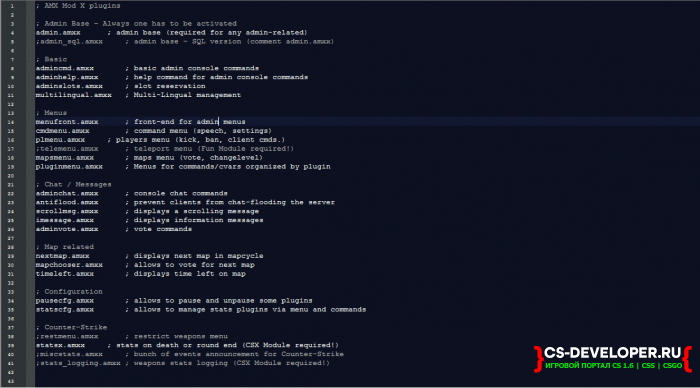
And add its name with the .amxx extension at the very end of the file plugins.ini (which is located at this path: Your servercstrikeaddonsamxmodxconfigs)
For example, I have this plugin: dd_injectorX.amxx, so I enter dd_injectorX.amxx в plugins.ini
(Optional, if available) Next, you need to place the settings file (the server will read the plugin's cvars/values from it)
If there is no configuration file, it isn't necessary.
(Optional, if available) Next, you need to place the lang file (dictionary, the server will get the words from it)
Author: Deadly Darkness
Source: Dead (there's fuck-all to do there)
If you've just started your own server, you'll most likely want to add your own “special touch” with plugins. But how do you install them? - We'll try to answer that question!
First, you need a plugin. If you don't have one, you can download it from our site. After you've downloaded the plugin, you may have these files: plugin (.amxx), source (.sma), lang file (.txt), resources (models, sprites, sounds, etc.).
To install it, you must put your plugin (in .amxx format) in this path:
Ваш серверcstrikeaddonsamxmodxpluginsAnd add its name with the .amxx extension at the very end of the file plugins.ini (which is located at this path: Your servercstrikeaddonsamxmodxconfigs)
For example, I have this plugin: dd_injectorX.amxx, so I enter dd_injectorX.amxx в plugins.ini
If there is no .amxx file, but there is a source file (in .sma format), you need to compile the plugin
(Optional, if available) Next, you need to place the settings file (the server will read the plugin's cvars/values from it)
If there is no configuration file, it isn't necessary.
Ваш серверcstrikeaddonsamxmodxconfigs(Optional, if available) Next, you need to place the lang file (dictionary, the server will get the words from it)
Ваш серверcstrikeaddonsamxmodxdatalangPut resources in these paths:
Для моделей: Ваш серверcstrikemodels
Для звуков:  Ваш серверcstrikesound
Для спрайтов: Чистый серверcstrikesprites
Author: Deadly Darkness
Source: Dead (there's fuck-all to do there)
Comments (0)